

retroshelf
Retroshelf automatically logs your retro handheld gaming sessions, letting you track playtime, discover trending games, and connect with other.
About retroshelf
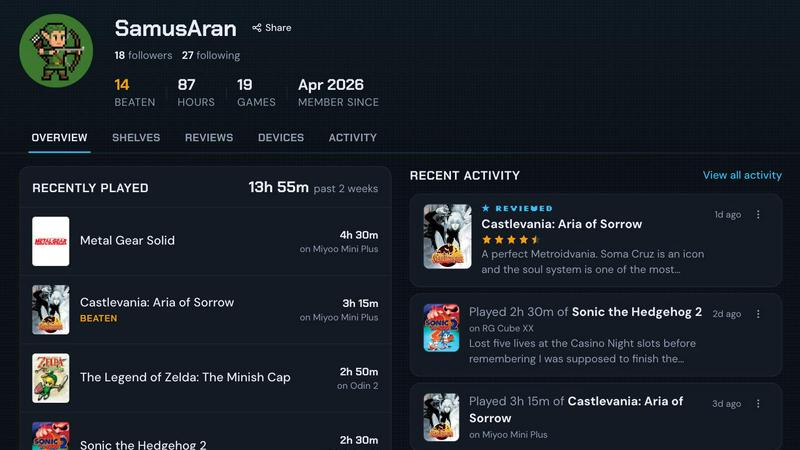
retroshelf is a specialized play-tracking and discovery platform built exclusively for retro handheld gaming enthusiasts. It addresses a common challenge faced by players who own multiple devices like the Miyoo Mini, Anbernic RG series, or Odin handhelds: keeping a coherent record of what they have played, finished, or replayed across different systems. Instead of relying on scattered notes, memory, or manual spreadsheets, retroshelf provides a centralized, automated solution. A tiny plugin installed on the user's handheld device runs in the background, capturing every gaming session automatically. It logs critical details such as the game title, total playtime, and the specific handheld used. This data is then organized into a public "shelf" that displays the user's current activity, completed games, reviews, and replays. The platform transforms raw session data into a browsable timeline, allowing users to reflect on their gaming history and discover new titles by observing what others in the community are playing. retroshelf is currently in a closed beta phase, inviting passionate retro handheld players to help shape the community from its early stages. The core value proposition is simple: every game you play is worth remembering, and retroshelf makes that effortless.
Features of retroshelf
Automatic Session Logging
retroshelf eliminates manual tracking by using a lightweight plugin that runs directly on supported retro handheld devices. Once the plugin is placed on the device's SD card and linked to the user's account, it automatically records every gaming session. This includes the game title, the duration of play, and the specific handheld model being used. Users no longer need to pause their gameplay to take notes or update spreadsheets; the log updates seamlessly while they are still playing.
Public Shelf with Device Context
Each user has a public shelf that showcases their gaming activity with full device context. The shelf displays four distinct categories: currently playing, finished games, games under review, and games being replayed. Unlike generic game tracking services, retroshelf associates every entry with the handheld it was played on. This means a review of "Final Fantasy" on a Miyoo Mini is presented differently from a playthrough on an Odin, providing richer, more relevant information to the community.
Browseable Timeline of Play History
retroshelf organizes all logged sessions into a clear, chronological timeline. This feature turns scattered play sessions across multiple handhelds into a coherent, browsable history. Users can look back at their year of play, see what they played on specific dates, and understand their gaming habits over time. The timeline is designed to be legible and easy to navigate, making it simple to revisit past gaming moments and track progress.
Community Discovery and Filtering
The platform doubles as a discovery tool by showing what other retro handheld players are currently picking up, finishing, and replaying. Users can browse a "Popular This Week" feed to see trending games within the community. Additionally, shelves can be filtered by specific devices, such as Miyoo, Anbernic, or Odin. Reviews include the handheld context, so star ratings are accompanied by information on which device the game was played on, giving more meaningful recommendations.
Use Cases of retroshelf
Tracking a Multi-Device Gaming Library
A collector who owns several retro handhelds, such as an Anbernic RG35XX for Game Boy games and an Odin 2 for PlayStation Portable titles, can use retroshelf to maintain a unified log. The automatic plugin on each device captures sessions independently, and the timeline merges all data into one coherent view. This eliminates the need to remember which device was used for which game and provides a complete picture of the user's gaming habits across their entire collection.
Discovering New Games Through Real Player Activity
A user looking for their next retro title can browse the "Popular This Week" section to see what games other handheld players are actively playing, finishing, and replaying. Instead of relying on generic reviews, they can filter by their specific device model to see how a game performs and is rated on the same hardware. This provides authentic, context-aware recommendations directly from the community of like-minded enthusiasts.
Reflecting on Personal Gaming Habits Over Time
A player who wants to understand their gaming patterns can use the browsable timeline feature. At the end of a month or year, they can scroll through their logged sessions to see which games they spent the most time on, which handhelds they used most frequently, and how their tastes evolved. This reflective use case turns raw play data into a meaningful personal history of their retro gaming journey.
Writing Contextual Reviews for the Community
A power user who enjoys sharing opinions can write reviews that are automatically tagged with the handheld used during gameplay. This adds significant value because a game's performance and feel can vary greatly between devices. When another user sees a review for "Castlevania: Symphony of the Night" played on a Miyoo Mini, they know the rating is based on that specific experience, making the review more useful and trustworthy than a generic star rating.
Frequently Asked Questions
How does the automatic session logging work?
retroshelf uses a tiny plugin that you download and place onto your handheld device's SD card. After linking your device to your retroshelf account, the plugin runs in the background while you play. It automatically detects the game being played, records the session duration, and logs the handheld model. When you finish a session, the data is synced to your retroshelf account, updating your shelf without any manual input from you.
Which handheld operating systems are currently supported?
During the closed beta phase, retroshelf officially supports muOS and OnionOS. These are two of the most popular custom firmware options for retro handhelds like the Miyoo Mini and Anbernic devices. The development team is actively working on expanding support to other operating systems based on community feedback and demand during the beta period.
Is my gaming shelf public by default?
Yes, your shelf is public by default, which is a core part of retroshelf's discovery features. The platform is designed to build a community where players can see what others are playing, finishing, and replaying. This public visibility allows for the "Popular This Week" feed and device-specific browsing. You can manage your profile and shelf settings through your account dashboard.
How can I join the closed beta?
retroshelf is currently in a closed beta phase. You can join the waitlist by visiting the retroshelf website and clicking the "Join beta" button. The team is opening access in small waves, prioritizing retro handheld players who are eager to help shape the community and provide feedback on features. Once accepted, you will receive instructions on how to set up your account and install the plugin on your device.
Explore more in this category:
Similar to retroshelf

Caesura
Caesura is a macOS menu-bar app that reminds you to drink water, stretch, rest your eyes, and breathe on scientifically backed intervals.

PrettyScale
PrettyScale offers nine free AI face analysis tools that run entirely in your browser for private, instant results without any uploads or accounts.

Burge Coffee
Burge Coffee is a free, no-account-required home roasting guide with tools, field guides, and a map of small roasters for serious coffee craft.

On Music AI
On Music AI transforms your text, lyrics, or ideas into complete AI-generated songs with vocals, beats, and instrumentals in minutes.

Bloom Plant ID
Bloom Plant ID uses AI to identify plants, diagnose diseases, and send personalized care reminders for confident gardening.

HavenBook
HavenBook uses AI to learn your home and deliver a personalized weekly maintenance plan that prevents costly repairs.

NinjaHackz
NinjaHackz is a portable CS2 cheat that uses aimbot, wallhack, and ESPs to let you play the game your way without limits.

True Moments
True Moments animates your photos with natural movement in seconds, preserving cherished memories as private, shareable videos.