

Caesura
Caesura is a macOS menu-bar app that reminds you to drink water, stretch, rest your eyes, and breathe on scientifically backed intervals.
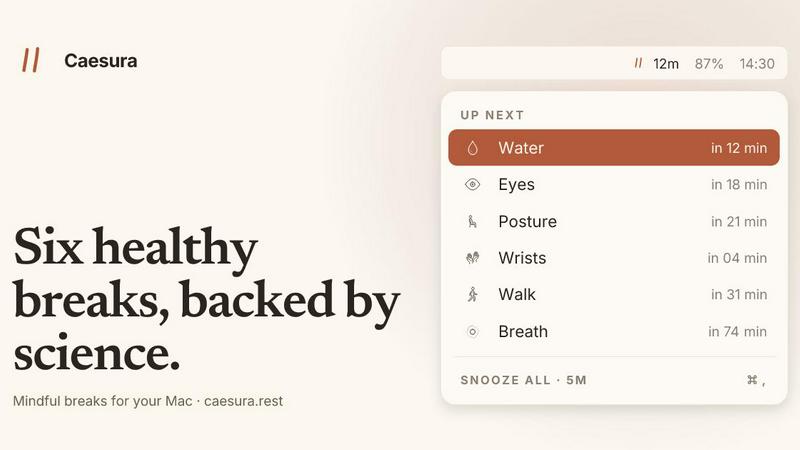
About Caesura
Caesura is a calm, minimalist macOS menu-bar break manager designed specifically for people who spend long hours at a desk. It addresses the common challenge of maintaining physical wellbeing during extended periods of computer work by providing timely, science-backed reminders for six essential healthy habits: drinking water, walking, stretching your wrists, resting your eyes, checking your posture, and breathing. Each reminder operates on its own independent schedule, with intervals derived from peer-reviewed research rather than arbitrary round numbers. What sets Caesura apart is its intelligent coalescing system: when two reminders fall close together in time, they merge into a single gentle break notification, ensuring you are never interrupted twice in a row. The application respects your workflow by automatically pausing during video calls, screen sharing, fullscreen apps, calendar events, and Focus modes, then resuming exactly where it left off. Caesura requires no accounts, no telemetry, and no subscriptions, offering a one-time purchase model for permanent access. It is available for macOS 14 and later, and you can try it free for 14 days before committing to the purchase.
Features of Caesura
Six Science-Backed Break Reminders
Caesura tracks six distinct healthy habits, each with an interval supported by scientific research. Water reminders appear every 45 minutes based on hydration studies. Walking reminders activate every 60 minutes to encourage movement. Wrist stretch reminders fire every 30 minutes to prevent repetitive strain. Eye rest reminders follow the 20-20-20 rule every 20 minutes. Posture reminders prompt a position shift every 30 minutes. Breathing reminders guide you through three cycles every 90 minutes. Each break can be individually toggled on or off, and you can adjust its interval or choose how it appears on your screen.
Intelligent Coalescing of Reminders
When two or more break reminders are scheduled to appear within a short window of each other, Caesura automatically merges them into a single, unified break prompt. This prevents the frustration of back-to-back interruptions that disrupt your workflow. Instead of seeing separate notifications for water and posture within one minute, you receive one consolidated reminder that addresses both needs. This coalescing feature respects your focus while ensuring you still attend to all necessary breaks.
Automatic Pause and Resume for Busy Moments
Caesura intelligently detects when you are engaged in activities that should not be interrupted. It monitors for video calls, screen sharing, fullscreen applications, Do Not Disturb mode, calendar events, games, and FaceTime usage. When any of these are active, every timer freezes immediately. After the activity ends, timers resume exactly where they left off, so if you had 12 minutes remaining until your water break, you still have 12 minutes after the call. This ensures you never miss a break due to a meeting or focused work session.
Customizable Break Presentation Styles
Each break type can be assigned one of three presentation styles, giving you full control over how intrusive or subtle the reminders are. The Overlay style takes over your entire screen until you acknowledge it, ideal for breaks you might otherwise ignore. The Banner style slides in from under the menu bar and auto-dismisses after 30 seconds, providing a gentle nudge. The Notification style appears as a standard macOS notification, offering the lightest possible touch. You can mix and match styles per break type based on your preferences.
Use Cases of Caesura
Remote Workers and Freelancers
Professionals working from home often lack the natural movement cues found in office environments, such as walking to meetings or getting water from a cooler. Caesura provides structured reminders that mimic these natural interruptions, ensuring remote workers maintain hydration, move regularly, and rest their eyes throughout the day. The automatic pause during calls and screen sharing means the app works seamlessly with their existing workflow.
Software Developers and Engineers
Developers frequently enter deep focus states known as flow, where hours can pass without a break. Caesuras science-backed intervals and coalescing system respect this flow while still prompting essential health habits. The customizable presentation styles allow developers to choose subtle banner or notification reminders during coding sessions, while using full overlays for breaks they might otherwise skip, like wrist stretches and posture checks.
Designers and Creative Professionals
Creative professionals who spend extended periods at a drawing tablet or design workstation benefit from Caesuras wrist stretch and eye rest reminders. The guided breathing exercises help reduce stress during tight deadlines. The automatic pause during fullscreen applications like Photoshop or Final Cut Pro ensures breaks do not interrupt rendering or complex editing tasks, while the cursor countdown feature for eye breaks provides a visual cue to look away from the screen.
Office Workers and Long-Hours Desk Employees
Anyone with a desk-based job can benefit from Caesuras comprehensive approach to workplace wellness. The app replaces the need to remember multiple independent health habits, consolidating them into a single, intelligent system. The coalescing feature ensures that even during busy periods with overlapping meetings and deadlines, users receive only one break notification at a time, reducing notification fatigue while maintaining healthy habits.
Frequently Asked Questions
How does Caesura know when I am on a call or busy?
Caesura monitors your macOS system for indicators of activity such as camera usage, screen sharing sessions, fullscreen applications, Do Not Disturb mode, calendar events, and specific apps like FaceTime. When any of these are detected, all break timers freeze automatically. After the activity ends, timers resume exactly where they left off. Caesura does not record or transmit any data about your activity; all detection happens locally on your machine.
Can I customize which breaks I receive and how often?
Yes, absolutely. Each of the six break types can be individually toggled on or off. You can also adjust the interval for each break to a custom duration if the default science-backed interval does not suit your schedule. Additionally, you can choose the presentation style per break, selecting between Overlay, Banner, or Notification. This level of customization ensures the app adapts to your personal preferences and workflow.
Is my data private? Do I need to create an account?
Caesura is designed with privacy as a core principle. It requires no account creation, no email registration, and no credit card for the trial period. The app does not collect telemetry, usage data, or any personal information. All activity detection and break scheduling happens entirely on your local machine. The one-time purchase model means you own the software outright with no recurring payments or data harvesting.
What happens if I miss a break notification?
If you dismiss or ignore a break notification, Caesura simply moves on to the next scheduled reminder based on the original interval. The app does not nag or accumulate missed breaks. However, the coalescing feature helps ensure that if you miss a break due to being busy, the next reminder might combine with another upcoming break to minimize disruption. You can also manually trigger any break at any time from the menu bar if you feel the need.
Pricing of Caesura
Caesura is available as a one-time purchase for $15. This single payment grants you permanent access to the full application with no subscription fees, no recurring charges, and no hidden costs. You can try the app free for 14 days before making a purchase decision. No credit card is required to start the trial, and no account creation is necessary. The purchase is a one-time transaction with no card-on-file storage. Caesura is compatible with macOS 14 and later versions.
Explore more in this category:
Best Lifestyle & Entertainment products
Best Personal Development products
Similar to Caesura

Kody Tools
Free collection of online developer utilities, code formatters, and digital converters designed to streamline your daily workflow.

Forms Plugin
The #1 Native Form Builder Plugin for Framer - No Code, No Embeds, No External Platforms.


tallycounterweb.com
Tally Counter is a simple online counting tool for tracking attendance, workouts, inventory, sports scores, visitors, and everyday activities.


iHatePosting
Schedule, customize, and publish content across 14 social networks from one powerful social media scheduler.