

ytskim
ytskim transcribes and summarizes YouTube videos using AI to save you time and extract key insights.
About ytskim
ytskim is a powerful AI-driven tool designed to extract accurate transcripts and generate structured summaries from any YouTube video in seconds. This product serves a wide range of users including students, researchers, content creators, journalists, and professionals who need to quickly access and digest video content without watching the entire footage. The core value proposition of ytskim lies in its ability to save significant time and effort by converting lengthy video content into concise, organized text formats. Users simply provide a YouTube video URL, and the tool processes the video to produce a complete transcript of the spoken content, alongside a well-structured summary that captures the key points, arguments, and conclusions. This dual output ensures that users not only have a verbatim record of the video but also a distilled version that highlights the most important information. The tool leverages advanced speech recognition and natural language processing technologies to ensure high accuracy in transcription and intelligent summarization. Whether you are conducting research, creating content, preparing study materials, or simply trying to stay informed, ytskim streamlines the process of extracting valuable information from video content. It eliminates the need for manual note-taking, tedious rewinding, and time-consuming transcription tasks. By providing both the raw transcript and the structured summary, ytskim empowers users to engage with video content more efficiently, making it an essential tool for anyone who regularly consumes or analyzes YouTube videos.
Features of ytskim
Accurate Transcription
ytskim utilizes state-of-the-art speech recognition technology to deliver highly accurate transcripts of YouTube video content. The system is capable of handling various accents, speaking speeds, and audio qualities to ensure that every word is captured correctly. This feature is essential for users who need a verbatim record of the video for research, documentation, or accessibility purposes. The transcription process is fully automated and completes within seconds, providing users with a clean, readable text file that can be easily copied, searched, or exported.
Structured Summarization
Beyond simple transcription, ytskim employs advanced natural language processing algorithms to generate structured summaries that organize the video content into logical sections. The summary highlights the main topics, key arguments, supporting evidence, and conclusions presented in the video. This structured format makes it easy for users to quickly grasp the essence of the video without watching it in its entirety. The summary is designed to be informative and concise, saving users valuable time while ensuring they do not miss critical information.
Instant Processing Speed
One of the standout features of ytskim is its lightning-fast processing speed. Users can obtain both the transcript and the summary within seconds of submitting a YouTube video URL. This rapid turnaround is made possible by optimized backend infrastructure and efficient AI models that process video content in real-time. This feature is particularly valuable for professionals and students who need to quickly extract information from multiple videos in a short period.
User-Friendly Interface
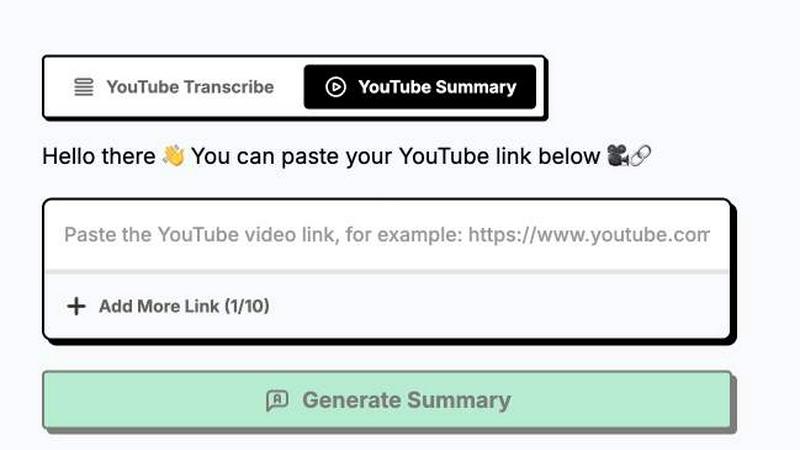
ytskim is designed with a clean and intuitive interface that requires no technical expertise to operate. Users simply paste a YouTube video link into the provided input field and click a single button to initiate the process. The results are displayed in a well-organized layout with the transcript and summary presented separately for easy navigation. The interface also includes options to copy text to the clipboard or download the output in various formats, ensuring a seamless user experience from start to finish.
Use Cases of ytskim
Academic Research and Study
Students and researchers can use ytskim to quickly extract key information from educational YouTube videos, lectures, and tutorials. Instead of watching long videos repeatedly, they can obtain a structured summary that captures the main concepts and arguments. The transcript also serves as a reliable reference for citations and quotations. This use case is especially beneficial for individuals preparing for exams, writing research papers, or conducting literature reviews where video content is a primary source of information.
Content Creation and Repurposing
Content creators, bloggers, and social media managers can leverage ytskim to repurpose YouTube video content into written formats such as blog posts, articles, social media captions, or newsletters. The transcript provides the raw material, while the structured summary helps identify the most engaging and relevant sections to highlight. This significantly reduces the time and effort required to transform video content into text-based assets, enabling creators to maintain a consistent publishing schedule across multiple platforms.
Journalism and Fact-Checking
Journalists and fact-checkers can use ytskim to quickly analyze interviews, press conferences, news reports, and other video content. The accurate transcription ensures that quotes are captured verbatim, while the structured summary helps identify the main points and potential discrepancies. This tool streamlines the verification process and allows journalists to produce accurate and timely reports without spending hours reviewing video footage.
Professional Development and Training
Professionals in various fields can use ytskim to extract insights from industry webinars, conference presentations, and training videos. The structured summary provides a quick overview of the key takeaways, enabling professionals to stay updated with the latest trends and best practices without dedicating extensive time to watching full videos. The transcript also serves as a reference document that can be shared with colleagues or used for future training purposes.
Frequently Asked Questions
How does ytskim generate transcripts and summaries?
ytskim uses advanced speech recognition technology to convert the audio from a YouTube video into text, creating an accurate transcript. It then applies natural language processing algorithms to analyze the transcript, identify key topics, main arguments, and supporting details, and organize them into a structured summary. The entire process is automated and typically completes within seconds of submitting the video URL.
Is ytskim free to use?
The current content does not specify pricing details. Users should visit the official ytskim website or platform to learn about available plans, free tiers, and subscription options. The tool may offer a limited number of free transcriptions per day or month, with paid plans providing additional features and higher usage limits.
What types of YouTube videos does ytskim support?
ytskim is designed to work with any publicly accessible YouTube video that contains spoken audio content. This includes educational videos, lectures, interviews, podcasts, news reports, tutorials, and more. The tool can process videos in multiple languages, although accuracy may vary depending on the language and audio quality. Videos with clear speech and minimal background noise typically yield the best results.
Can I download the transcript and summary as a file?
Yes, ytskim provides options to download both the transcript and the structured summary in common text formats. Users can typically copy the text directly to their clipboard for immediate use or download the output as a file for offline access and further editing. The specific download options and file formats available may vary depending on the platform or subscription plan.
Explore more in this category:
Similar to ytskim

FreeVideoGenerator
Free AI video generator: turn text prompts and photos into video clips with Sora 2, Veo 3.1, Wan and more. Free starter credits, no watermark download


Novastart
Apps and files on an infinite canvas where people and AI agents work together.

ButterShare
Transfer files between iPhone, Android, Windows, and Mac directly from your browser. Free, secure, and private. No apps, cloud storage, or signup.

AI Email Filter
AI Email Filter sorts incoming mail into folders using plain-language prompts you write. Works with any IMAP mailbox; bring your own LLM if you want.


Product Launch Checklist
A free launch checklist for SaaS, apps, AI tools and more. Every step says why it matters and when you can skip it.

Kody Tools
Free collection of online developer utilities, code formatters, and digital converters designed to streamline your daily workflow.