

Very Good Calendar Sync
Very Good Calendar Sync effortlessly synchronizes your calendars while keeping your data private and secure, ensuring you never miss an appointment.
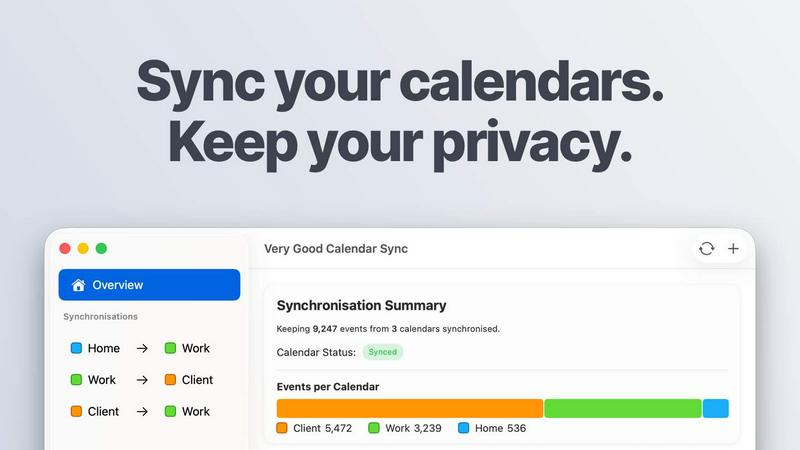
About Very Good Calendar Sync
Very Good Calendar Sync is a sophisticated application designed to seamlessly synchronize multiple calendars on your Mac. It ensures that your work, personal, and client calendars remain perfectly aligned without the need for manual input or cross-checking. The app operates quietly in the background, automatically syncing changes as they occur, which eliminates the risk of double-bookings and calendar chaos. Users can set specific synchronization rules according to their preferences, including which days and hours to sync, making it adaptable to various lifestyles and work schedules. Ideal for professionals such as consultants, freelancers, and employees managing multiple calendars, Very Good Calendar Sync prioritizes user privacy by keeping all data securely on the Mac without any third-party access. Its value proposition lies in its simplicity, efficiency, and strong focus on privacy, allowing users to maintain their schedules effortlessly and with complete control.
Features of Very Good Calendar Sync
Automatic Background Synchronization
Very Good Calendar Sync runs continuously in the background, monitoring any changes in your calendars. As soon as a new event is added or an existing one is modified, it automatically updates across all chosen calendars without requiring any additional action from the user.
Customizable Synchronization Rules
Users can tailor the synchronization settings to meet their specific needs. You can choose to sync only on weekdays, exclude weekends, or set specific hours for syncing, ensuring that your personal time is respected while keeping professional commitments organized.
Privacy-Centric Design
This app is designed with user privacy in mind. All calendar data remains on your Mac, meaning there is no need to share credentials or grant access to third-party services. Your information is never transmitted externally, giving you peace of mind regarding your sensitive data.
Flexible Event Sharing Options
With Very Good Calendar Sync, you can control what information is shared when synchronizing events. Users can choose to share detailed event information or simply indicate their availability, ensuring that sensitive details remain confidential while keeping others informed of your schedule.
Use Cases of Very Good Calendar Sync
Consultants Managing Client Calendars
Consultants can utilize Very Good Calendar Sync to keep client meetings in sync with their personal schedules. This prevents conflicts and double-bookings, allowing for a streamlined approach to managing multiple client engagements without the stress of manual checks.
Employees with Dual Calendars
For employees who juggle both work and personal calendars, this app ensures that important appointments, like medical visits or family events, do not interfere with work obligations. It provides a clear view of availability, reducing the chance of scheduling conflicts.
Freelancers Balancing Multiple Projects
Freelancers often have to manage various projects across different clients. By using Very Good Calendar Sync, they can ensure that all project deadlines and meetings are accurately reflected across their calendars, allowing for better time management and client communication.
Teams Coordinating Internal and External Schedules
Teams can benefit from the app by keeping internal meetings aligned with client schedules. It provides a unified view of availability, eliminating confusion and ensuring that everyone is aware of each other's commitments in real-time.
Frequently Asked Questions
Do you store any of my calendar data?
No, Very Good Calendar Sync does not store any calendar data. All information is kept locally on your Mac, ensuring that your privacy is maintained and no data is sent to external servers.
Which calendar providers are supported?
The app is compatible with any calendar that integrates with macOS' Calendar.app, including Google Calendar, Microsoft Outlook/Exchange, and Apple iCloud, among others.
Does it sync when my Mac is off or asleep?
No, Very Good Calendar Sync requires your Mac to be powered on and awake to perform sync operations. However, once your Mac is active, it will automatically sync any changes made while it was off.
Is this app available for Windows?
Currently, Very Good Calendar Sync is designed exclusively for macOS and is not available for Windows or other operating systems, focusing on the unique capabilities of the Mac environment.
Pricing of Very Good Calendar Sync
One synchronization between two calendars is completely free, with no payment required. When you're ready for more, you can choose from various plans: a flexible monthly subscription at £1.99 per month, an annual plan at £19.99 per year (which saves over 15% compared to the monthly option), or a lifetime plan for a one-time payment of £39.99 that includes all future updates. All plans provide unlimited synchronizations with all calendar providers and include email support.
Explore more in this category:
Similar to Very Good Calendar Sync

Product Launch Checklist
A free launch checklist for SaaS, apps, AI tools and more. Every step says why it matters and when you can skip it.

Kody Tools
Free collection of online developer utilities, code formatters, and digital converters designed to streamline your daily workflow.

Forms Plugin
The #1 Native Form Builder Plugin for Framer - No Code, No Embeds, No External Platforms.


tallycounterweb.com
Tally Counter is a simple online counting tool for tracking attendance, workouts, inventory, sports scores, visitors, and everyday activities.


iHatePosting
Schedule, customize, and publish content across 14 social networks from one powerful social media scheduler.
