

Prompt Builder
Prompt Builder instantly creates, refines, and manages AI prompts for models like ChatGPT and Gemini in one workspace.
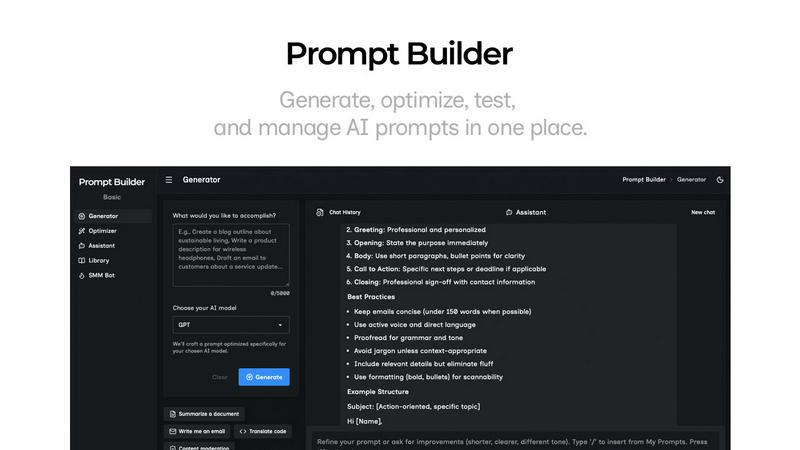
About Prompt Builder
Prompt Builder is a comprehensive prompt engineering workspace designed to streamline the entire process of creating, testing, and managing AI prompts. It serves as a centralized hub for professionals, creators, and developers who rely on large language models (LLMs) to generate content, code, analysis, and more. The core value proposition is eliminating the inefficiency of manually rewriting and testing prompts across different AI models. Instead of spending hours crafting the perfect instruction, users describe their task in plain English. Prompt Builder then generates a model-optimized draft, provides a chat interface for iterative refinement, and offers robust tools for saving, organizing, and reusing the best versions. It supports a wide array of leading models including GPT, Claude, Gemini, Llama, Mistral, and Grok, ensuring you get the best possible output regardless of your chosen AI. By consolidating generation, testing, and library management into one seamless workflow, Prompt Builder transforms an initial idea into a production-ready, reusable asset in seconds, saving time and maximizing the quality and consistency of AI-generated results.
Features of Prompt Builder
Prompt Generator
The Prompt Generator is the starting point for any project. You simply describe your task or idea in natural language and select your target AI model (e.g., Gemini, Claude, GPT-4). The tool then crafts a professional-grade, model-specific prompt draft for you. This initial prompt is not generic; it is tuned with the appropriate structure, constraints, and output format preferences known to work well with your chosen model. This feature acts as your dedicated ChatGPT, Claude, or Gemini prompt generator, providing a powerful head start that you can then refine further within the integrated chat workspace.
Prompt Assistant & Chat Workspace
This integrated feature allows you to test and iterate on your prompts without ever leaving Prompt Builder. The Prompt Assistant lets you run your generated or optimized prompts directly within the platform using a selector of assistant models like Grok, Gemini, or GPT. You can have conversational follow-ups, make adjustments, and see results in real-time. All chat history is saved, enabling fast iterations. The key benefit is organization: you can pin specific successful chat responses to your Library, ensuring you never lose a "good version" in a messy thread again.
Prompt Optimizer
The Optimizer tool is designed to elevate existing prompts. You can paste any prompt—whether from an external source or selected from your personal Library—and the Optimizer will analyze and enhance it. It provides structured improvements focusing on clarity, adding necessary constraints, defining output formats, and suggesting examples. Each optimization is saved in a history log, and you can pin your favorite versions. With one click, you can send the optimized prompt to the Assistant for immediate testing, creating a rapid improvement loop.
Prompt Library & Community Templates
This feature is your central repository for prompt management and discovery. Your Library stores all your saved, pinned, and organized prompts, searchable and filterable by category and target model. Any saved prompt can be instantly run in the Assistant as a new chat. Beyond personal storage, you gain access to a curated collection of Community Prompts and templates. This allows you to explore proven prompts from other users, adapt them to your needs, and add them to your own Library, significantly accelerating your workflow and providing inspiration.
Use Cases of Prompt Builder
Content Creation & Marketing
Writers, marketers, and social media managers can use Prompt Builder to rapidly generate and refine content prompts. The SMM Bot feature specifically turns a brief into platform-ready posts for X, LinkedIn, Instagram, and more, complete with tone adjustments, hashtags, and CTAs. You can generate a first draft for a blog post, refine the tone in chat, save the perfect prompt for "LinkedIn carousel posts," and reuse it weekly, ensuring consistent brand voice and high-quality output across all channels.
Software Development & Technical Tasks
Developers and engineers can leverage the tool to create precise prompts for code generation, debugging, documentation, and system design. By using the Prompt Generator tuned for a code-savvy model like Claude or GPT, you get a draft that properly structures requests for functions, algorithms, or explanations. The chat workspace allows for iterative debugging and clarification. Saving optimized prompts for common tasks like "generate a React component" or "write a Python API test" builds a personal library of efficient coding assistants.
Research & Data Analysis
Researchers, analysts, and students can utilize Prompt Builder to craft detailed prompts for summarizing articles, extracting insights from data, generating literature reviews, or formulating hypotheses. The ability to optimize a prompt for clarity and specific output formats (e.g., "create a table comparing X and Y") is invaluable. The Library helps organize prompts for different research phases, and using the Assistant with a model like Perplexity or Gemini allows for deep, source-aware Q&A sessions within the same organized environment.
Business Operations & Productivity
Professionals across roles can streamline operational tasks. This includes generating meeting agendas, drafting emails, creating project plans, synthesizing report findings, or brainstorming ideas. The core workflow—describe a task, get a model-tuned draft, refine it conversationally, and save the final version—turns repetitive administrative work into a one-click operation. Teams can share effective prompts via the Library, standardizing processes and improving overall organizational efficiency with AI.
Frequently Asked Questions
What AI models does Prompt Builder work with?
Prompt Builder is compatible with a wide range of popular large language models. This includes OpenAI's GPT models (like ChatGPT), Anthropic's Claude, Google's Gemini, Meta's Llama, Mistral AI's models, DeepSeek, xAI's Grok, Perplexity, and Cohere. The Prompt Generator tailors your prompt's structure specifically for the model you select, and the Assistant feature allows you to run and test prompts using many of these models directly within the platform.
How does the free plan work?
The free plan offers a generous trial to experience the core functionality of Prompt Builder. It includes 25 assistant requests per month, allowing you to test and run prompts within the platform's chat workspace using various AI models. This plan does not require a credit card to start. It provides full access to the Prompt Generator, Optimizer, Library, and Community Prompts, enabling you to create, refine, and save prompts at no cost within the monthly request limit.
Can I reuse and organize my prompts?
Absolutely. This is a core strength of Prompt Builder. You can save any prompt you create or optimize directly to your personal Library. The Library is fully searchable and can be filtered by category and target model. You can also "pin" specific chat responses or prompt versions, ensuring your best work is always easy to find and reuse. This creates a growing asset of effective prompts that can be run instantly in the Assistant for any new project or task.
What is the SMM Bot feature?
The SMM Bot is a specialized tool within Prompt Builder designed for social media marketing. You provide a content brief, and it generates platform-specific posts tailored for networks like X (Twitter), LinkedIn, Instagram, TikTok, and Reddit. It allows for customization of tone, audience, and format (including threads, carousels, scripts, and hooks), and suggests relevant hashtags and calls-to-action. The resulting prompts can be refined in chat and saved to your Library for consistent, on-brand social content creation.
Similar to Prompt Builder


WidgIq
Provide an AI-powered customer support widget for your website


ContextBolt SEO
Research keywords, competitors, backlinks and AI visibility in Claude or Codex. Keep the findings in your SEO dashboard.