

ProcessSpy
ProcessSpy is an advanced process monitor for macOS that provides in-depth insights and real-time filtering for optimal performance analysis.
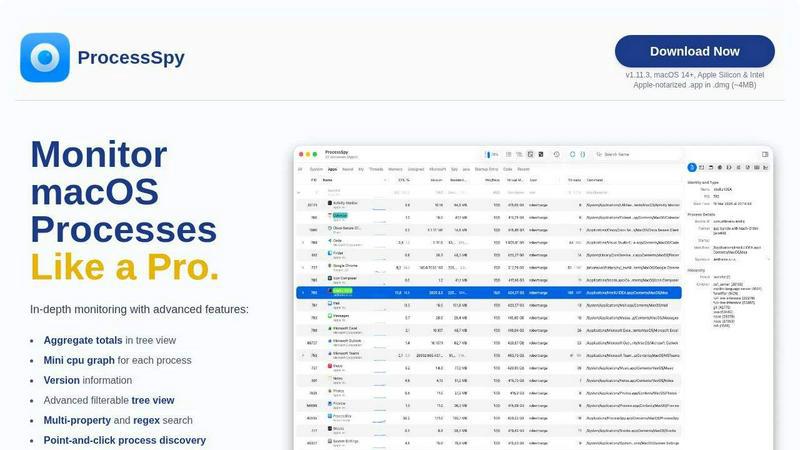
About ProcessSpy
ProcessSpy is a sophisticated process monitoring tool designed specifically for macOS users, providing in-depth insights into system processes that go beyond what the standard Activity Monitor offers. With its powerful features, ProcessSpy enables users to visualize process trees, inspect open files, view environment variables, and terminate unresponsive applications swiftly. It is particularly beneficial for developers and power users who require detailed process information and the ability to manage multiple applications efficiently. ProcessSpy utilizes native macOS APIs to ensure a seamless, responsive experience, maintaining tight integration with the operating system. Its advanced functionalities, such as JavaScript-based filtering and historical process tracking, make it an indispensable tool for anyone looking to optimize their workflow and enhance their understanding of system operations.
Features of ProcessSpy
Advanced Tree View
ProcessSpy's advanced tree view offers a structured representation of processes, allowing users to visualize relationships and dependencies. This feature includes real-time filtering and search capabilities, providing aggregate totals for CPU, Memory, and Threads, ensuring users can quickly assess system performance.
JavaScript Filters
With the ability to create complex filters using JavaScript, ProcessSpy enables users to define multi-condition searches. This powerful feature allows for precise filtering of processes based on various criteria, making it easier to identify specific applications and their resource consumption.
Detailed Process Information
ProcessSpy provides comprehensive details about each process, including command-line arguments, version information, and paths. This level of detail is crucial for developers who need to manage multiple applications running simultaneously, particularly when dealing with similar process names.
Process History Recording
The history recording feature allows users to track CPU, Memory, and Threads over time, storing historical data for analysis. This function is especially useful for troubleshooting performance issues and understanding application behavior, with results easily exportable to CSV for further examination.
Use Cases of ProcessSpy
Troubleshooting Performance Issues
When a user's Mac experiences slowdowns, ProcessSpy can help identify resource-hogging applications by providing detailed insights into CPU and Memory usage, enabling targeted troubleshooting and optimization.
Managing Multiple Java Applications
Developers juggling several Java applications can leverage ProcessSpy to view the specific JDK version and command-line arguments for each process. This clarity helps in managing dependencies and debugging issues more effectively.
Monitoring Application Behavior
ProcessSpy's ability to record process history allows users to monitor how applications behave over time. This feature can be invaluable for performance tuning and understanding the impact of changes made to applications or system settings.
Analyzing System Resource Usage
System administrators can utilize ProcessSpy to get a comprehensive view of resource usage across various processes. By visualizing process trees and employing advanced filters, they can make informed decisions about resource allocation and system upgrades.
Frequently Asked Questions
Is ProcessSpy safe to install on my Mac?
Yes, ProcessSpy is Apple-notarized and distributed as a signed .app within a .dmg file. It has been verified for safety and is compatible with both Intel and Apple Silicon Macs.
Does ProcessSpy support older versions of macOS?
ProcessSpy is designed specifically for macOS 14 and newer versions, ensuring optimal performance and access to the latest macOS features.
What is the license model?
The license for ProcessSpy is valid for one user across unlimited devices. It includes lifetime updates and access to new features, providing long-term value for users.
Can I use ProcessSpy for free?
While ProcessSpy offers a robust set of features, some advanced functionalities, such as viewing environment variables and process history recording, require a paid license. The license is priced at $24.99 for lifetime updates and use on unlimited devices.
Similar to ProcessSpy

stackledge
Cut through the AI hype and bot-scraped spam. StackLedge is a human-tested directory of active SaaS, useful AI tools, and custom n8n workflows.

WidgIq
Provide an AI-powered customer support widget for your website

Product Launch Checklist
A free launch checklist for SaaS, apps, AI tools and more. Every step says why it matters and when you can skip it.

Forms Plugin
The #1 Native Form Builder Plugin for Framer - No Code, No Embeds, No External Platforms.

Chatit Me - Free Random Chat Alternative
Chat with random strangers online for free on ChatIt.me. Enjoy safe, anonymous, and instant 1-on-1 conversations with people worldwide

PDFKing
Free all-in-one online PDF toolkit to convert, compress, merge, split, edit, organize and protect PDF files quickly and securely.


VidhyaGen
VidhyaGen is a set of lightweight online tools built to help you convert files and create useful outputs fast without unnecessary steps, signups, or