

Meme Library
Meme Library uses OCR to let you search memes by text inside images, organize your collection, and backup everything privately.
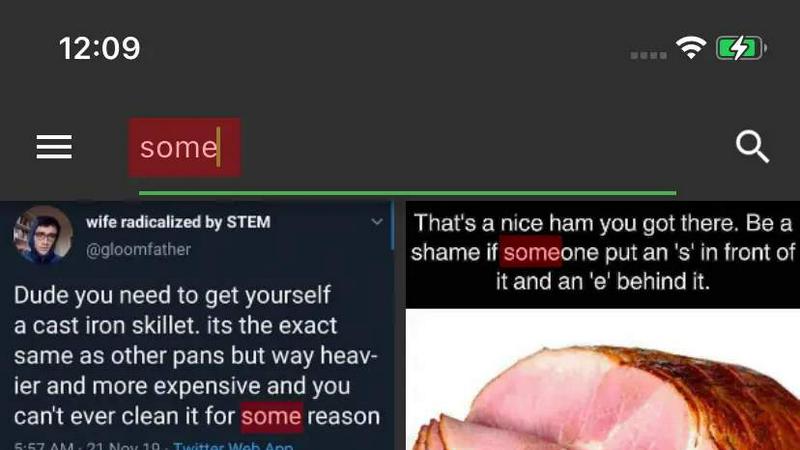
About Meme Library
Meme Library is a dedicated mobile application designed to solve the fundamental problem faced by meme enthusiasts: the inability to quickly find and share the perfect image from a growing, chaotic collection. This app serves as a private, searchable, and organized home for your entire meme inventory, transforming a messy camera roll into a functional, high-speed reaction library. The core value proposition is simple: never lose a meme again, and be able to find the exact one you need in seconds. The app is built for anyone who saves reaction memes, niche jokes, screenshots of funny posts, or internet classics. Unlike general photo gallery apps, Meme Library is purpose-built for how people actually use memes, prioritizing fast recall and fast sharing. It offers a lightweight, clean interface with no bloat, no ads, and no social feeds, ensuring your focus remains on your collection. A standout feature is the ability to search memes by the actual text contained within the image, including screenshots, captions, and even screenshots of screenshots. This powerful search capability, combined with the ability to save memes from virtually any source, makes Meme Library an indispensable tool for personal expression and communication. Furthermore, the app includes optional backup and restore functionality, ensuring your carefully curated collection remains safe if you switch phones or reinstall the application. Privacy is a core principle, with all memes staying on your device by default, free from any tracking or forced sharing. In essence, Meme Library is a focused, powerful vault that turns your meme habit into a well-organized, instantly accessible asset.
Features of Meme Library
Text Search Inside Images
This is the flagship feature that sets Meme Library apart from standard photo albums. The app utilizes optical character recognition (OCR) technology to scan and index all visible text within your saved memes. This includes not just the main caption but also text in watermarks, background signs, or any other part of the image. When you need a specific reaction, you can simply type a keyword or phrase, and the app will instantly return all memes containing that text. This eliminates the need to remember file names, dates, or visual details, making the search process incredibly efficient and intuitive for finding that one specific screenshot or meme format you need.
Save From Anywhere
Meme Library is designed to be a seamless part of your mobile workflow, offering extreme flexibility in how you add content. You can save memes directly from your device's camera roll or gallery. More powerfully, the app integrates deeply with the operating system's share sheet, allowing you to save memes directly from Instagram, Reddit, Twitter, any web browser, or any other app that supports sharing. This "save from anywhere" capability means you never have to go through a multi-step download and import process. The moment you see a meme you want to keep, you can save it to Meme Library with just a couple of taps, ensuring your collection grows effortlessly.
Backup and Restore
Recognizing that a meme collection can be a significant and personal digital asset, Meme Library provides a robust backup and restore system. This feature allows you to create secure backups of your entire collection, including all images, tags, and search indexes. If you upgrade to a new phone, experience a device failure, or simply need to reinstall the app, you can easily restore your entire library from a previous backup. This ensures that your carefully curated set of reaction images, niche jokes, and internet classics is never lost. The process is designed to be straightforward, giving you peace of mind that your collection is safe across devices and over time.
Private by Default
Meme Library operates on a strict privacy-first philosophy. All your memes are stored locally on your device and are never uploaded to any external server or social feed. There is no mandatory account creation, no tracking of your usage patterns, and no algorithms trying to recommend content. The app is designed to be a private vault, not a social network. You are free to curate and browse your collection without any external interference or data collection. This commitment to privacy ensures that your personal humor, inside jokes, and saved screenshots remain completely under your control, accessible only to you.
Use Cases of Meme Library
The Ultimate Reaction Arsenal
For anyone who frequently communicates in group chats, on social media, or in online forums, Meme Library becomes an essential tool for social interaction. Instead of endlessly scrolling through a camera roll or trying to remember where you saved a specific reaction image, you can instantly search for it by its text content. For example, typing "disaster" could bring up a meme of a cartoon character in a chaotic situation, while "fine" might retrieve a "This is fine" dog meme. This turns your meme collection into a high-speed reaction deck, allowing you to respond with the perfect image in seconds, keeping conversations lively and engaging.
Organizing Niche Joke Collections
Many people collect memes that are specific to their interests, such as programming humor, academic inside jokes, or sports-related content. Without a dedicated tool, these collections become mixed with personal photos and are hard to navigate. Meme Library allows users to organize these niche collections in one dedicated space. A software developer, for instance, can save memes about debugging, coding errors, and specific programming languages. The text search feature is particularly useful here, as they can search for terms like "JavaScript" or "bug" to find the perfect meme to share with their colleagues, keeping their professional humor organized and accessible.
Archiving Screenshots and Internet Classics
The internet is ephemeral, and posts, comments, or entire websites can disappear. Meme Library serves as a personal archive for important or funny screenshots and classic internet memes that you want to preserve. Instead of relying on bookmarks or hoping a post stays online, you can save a screenshot directly into the app. The text search then makes these archived images retrievable years later. A user could save a screenshot of a hilarious tweet or a screenshot of a now-deleted Reddit thread. When they remember the topic months later, they can simply search for a keyword from the text in the image to find it again.
Seamless Meme Migration Between Phones
Upgrading to a new phone is a common pain point for meme collectors, as transferring a large, unorganized folder of images can be difficult and often results in lost files. Meme Library solves this with its dedicated backup and restore feature. When a user gets a new device, they can simply restore their entire library from a cloud or local backup. This ensures that their entire collection, complete with all text-search indexes and organization, is instantly available on the new phone. This use case provides a seamless and stress-free experience, guaranteeing that your carefully built meme vault moves with you, regardless of the device.
Frequently Asked Questions
How does the text search inside images work?
Meme Library uses Optical Character Recognition (OCR) technology, which runs locally on your device. When you save a meme, the app scans the image for any visible text and creates a searchable index of those words. When you type a query, the app matches your keywords against this index and displays all memes containing that text. This happens entirely on your phone, ensuring your memes and search data remain private and are never sent to an external server.
Can I save memes from apps like Instagram or Reddit?
Yes. Meme Library integrates with your device's native share sheet. When you see a meme in any app that supports sharing (including Instagram, Reddit, Twitter, and web browsers), you can tap the "Share" button and select Meme Library from the list of options. The app will then save the image directly to your collection without requiring you to first download it to your camera roll. This provides a fast and streamlined way to save memes from virtually any source.
Is my meme collection private and secure?
Absolutely. Meme Library is designed with a "Private by Default" philosophy. All your memes are stored exclusively on your device's local storage. The app does not require you to create an account, does not upload your images to any cloud server, and does not track your usage or browsing habits. There is no social feed or forced sharing. Your collection is a private vault that only you can access, unless you choose to share a specific meme.
How do I backup and restore my meme collection?
The app provides a built-in Backup and Restore feature, typically found in the settings menu. To create a backup, you can choose to export your library to a cloud storage service (like Google Drive or iCloud) or to a local file. When you switch phones or reinstall the app, you can use the Restore function to import that backup file. This process will restore all your memes, along with their associated text search indexes and any organizational structure you have created.
Explore more in this category:
Similar to Meme Library

FreeVideoGenerator
Free AI video generator: turn text prompts and photos into video clips with Sora 2, Veo 3.1, Wan and more. Free starter credits, no watermark download


Novastart
Apps and files on an infinite canvas where people and AI agents work together.

ButterShare
Transfer files between iPhone, Android, Windows, and Mac directly from your browser. Free, secure, and private. No apps, cloud storage, or signup.

AI Email Filter
AI Email Filter sorts incoming mail into folders using plain-language prompts you write. Works with any IMAP mailbox; bring your own LLM if you want.


Product Launch Checklist
A free launch checklist for SaaS, apps, AI tools and more. Every step says why it matters and when you can skip it.

Kody Tools
Free collection of online developer utilities, code formatters, and digital converters designed to streamline your daily workflow.