

MCPize
MCPize is a marketplace where developers discover, install, and manage over 1,000 premium MCP servers for AI agents while publishers earn 80% revenue.
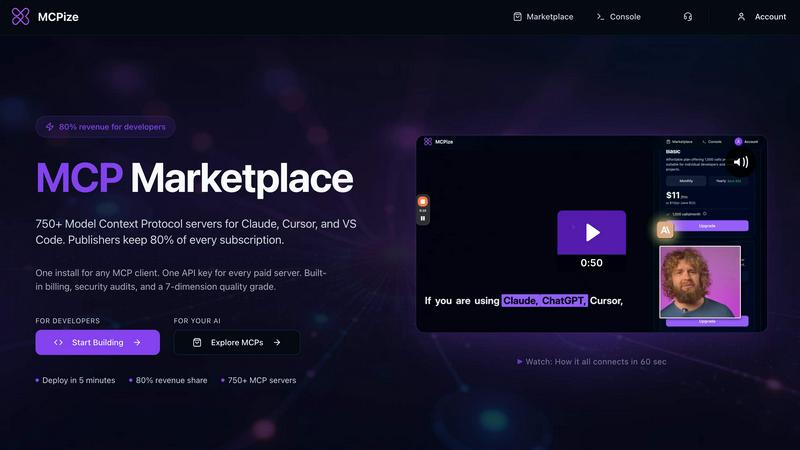
About MCPize
MCPize is the complete platform for Model Context Protocol (MCP) servers, designed to bridge the gap between AI agents and the tools they need to be truly useful. Think of it as the App Store for AI, but purpose-built for the new world of agentic workflows. At its core, MCPize is a vibrant marketplace featuring over 1,000 vetted MCP servers that integrate seamlessly with popular AI tools like Claude, Cursor, VS Code, Windsurf, and ChatGPT. Every single server on the platform undergoes a rigorous 7-dimension quality audit that checks for protocol compliance, OAuth security, reliability, and safety, so you never have to worry about plugging in a shady or broken tool. For developers, MCPize is a launchpad. You can publish and deploy a new MCP server in about 30 seconds using GitHub auto-deploy, and you get to keep 80 percent of every subscription dollar you earn. For users, it is a dream of simplicity. Instead of juggling a dozen different API keys and billing accounts, you get one unified API key, one consolidated bill, and one dashboard to track usage, costs, and set alerts. There is even a generous free tier that gives you 25,000 requests per month with no credit card required. Whether you are a solo developer building a niche tool or a large team looking to supercharge your AI workflows, MCPize provides the infrastructure, the audience, and the trust layer to make it all work. The platform currently hosts over 850 MCP servers, serves more than 1,000 developers, and has paid over 200,000 dollars to vendors through its ecosystem.
Features of MCPize
Vetted MCP Marketplace with 7-Dimension Quality Audit
Browse a curated collection of over 1,000 MCP servers, each rigorously tested across seven critical dimensions including protocol compliance, OAuth security, reliability, and safety. This ensures every server you install is trustworthy, functional, and free from vulnerabilities, eliminating the risk of integrating broken or malicious tools into your AI workflows.
Unified API Key and Consolidated Billing
Say goodbye to managing dozens of separate API keys and billing accounts for different services. MCPize provides a single, unified API key that works across all paid servers on the platform. You receive one consolidated monthly bill and a central dashboard to monitor usage, track costs, and set custom spending alerts for complete financial control.
Rapid Server Deployment with 80% Revenue Share
Developers can publish and deploy a new MCP server in approximately 30 seconds using GitHub auto-deploy integration. Once published, you retain 80 percent of every subscription dollar earned from your server. This high revenue share model, combined with instant deployment, makes MCPize an attractive launchpad for both solo developers and teams.
Generous Free Tier with No Credit Card Required
Get started with MCPize without any financial commitment. The platform offers a free tier that provides 25,000 requests per month. No credit card is required to sign up, allowing developers and users to explore the marketplace, test servers, and integrate MCP functionality into their projects risk-free before upgrading to paid plans.
Use Cases of MCPize
Supercharging AI Development with Specialized Tools
A software developer using Claude or Cursor can instantly connect to specialized MCP servers for tasks like generating architecture diagrams from Mermaid code, finding B2B email addresses, or analyzing viral content on X/Twitter. Instead of building these capabilities from scratch, the developer simply installs the server from MCPize and the AI agent gains these new skills immediately, dramatically accelerating development workflows.
Streamlining Fintech and Payment Integrations
A fintech startup building an e-commerce platform for the Bangladesh market can use MCPize to integrate a payment orchestration server that handles bKash and Nagad transactions. The unified API key and consolidated billing mean the team manages only one integration point instead of multiple payment gateways. The server's quality audit ensures secure handling of financial data and reliable transaction processing.
Enabling AI-Powered Marketing Campaigns
Marketing agencies can leverage MCPize to connect their AI assistants to a comprehensive digital marketing server with over 100 professional tools. This server enables the AI to generate SEO-optimized content, create high-converting ad copy, manage social media posts, and analyze campaign performance. The single dashboard tracks usage across all marketing activities, and alerts help teams stay within budget.
Building and Testing Custom MCP Servers
A developer experimenting with the Model Context Protocol can use MCPize to deploy a minimal test server like Superdemo in seconds. This allows them to validate client integrations, experiment with server extensions, and understand core MCP structures. Once the prototype is stable, the same platform enables publishing the server to the marketplace, reaching thousands of potential users and generating subscription revenue.
Frequently Asked Questions
How does the 7-dimension quality audit work?
Every MCP server listed on MCPize undergoes a rigorous automated and manual review process that checks seven specific dimensions: protocol compliance (adherence to MCP standards), OAuth security (proper authentication and authorization), reliability (uptime and error handling), safety (data privacy and input sanitization), performance (response times and scalability), documentation quality, and backward compatibility. Servers that fail any dimension are not published until issues are resolved, ensuring a consistently high-quality marketplace.
What AI tools are compatible with MCPize?
MCPize servers integrate seamlessly with any MCP-compatible AI client. Currently supported tools include Claude, Cursor, VS Code, Windsurf, Zed, and ChatGPT. The platform is designed to work with any application that supports the Model Context Protocol, so as more AI tools adopt MCP, they will automatically be compatible with MCPize servers without any additional configuration.
How do I get started with the free tier?
Getting started is simple. Visit the MCPize website and sign up for an account. No credit card is required. You will immediately receive a unified API key and access to the free tier, which provides 25,000 requests per month. You can then browse the marketplace, install any of the 1,000+ free or paid servers, and start integrating them with your AI tools. The dashboard will track your usage and notify you as you approach the free tier limit.
How do developers get paid for their MCP servers?
Developers who publish MCP servers on MCPize earn 80 percent of every subscription dollar their server generates. Payments are processed through the platform's built-in billing system. When a user subscribes to a server, MCPize handles all payment processing, customer management, and support. Revenue is automatically calculated and paid out to developers on a regular schedule. The platform provides detailed analytics so developers can track subscriptions, revenue, and user engagement.
Can I use MCPize for enterprise or team projects?
Yes, MCPize is designed to scale from solo developers to large teams. The unified dashboard allows team administrators to monitor usage across multiple projects, set spending alerts, and manage API keys for different team members. The consolidated billing simplifies expense tracking and reporting. Additionally, the quality audits and security checks provide the trust layer that enterprise teams require when integrating third-party tools into their AI workflows.
Similar to MCPize


CloneWebsite
Clone any webpage pixel-perfect, export HTML/CSS/ZIP or React/Vue components.

ogimagegenerator.dev
Paste a URL and AI designs on-brand Open Graph images from your page's colours, fonts and logo. Free, no sign-up.

Screen Issues
Free Online Screen Test Tool - Instantly diagnose dead pixels, lines, color issues, and flickering. Multiple test modes, no download needed.

CADCraft
Free, open-source 2D CAD in Rust with layers, precision tools, and AI-ready MCP, JSON, and CLI automation.

Best Latest Apps
Independent iOS app studio with 24 apps on the App Store


Ecommerce Data API
Amazon research data APIs, remote MCP and Agent Skills for products, keywords, markets, reviews and traffic.