

JustPDF
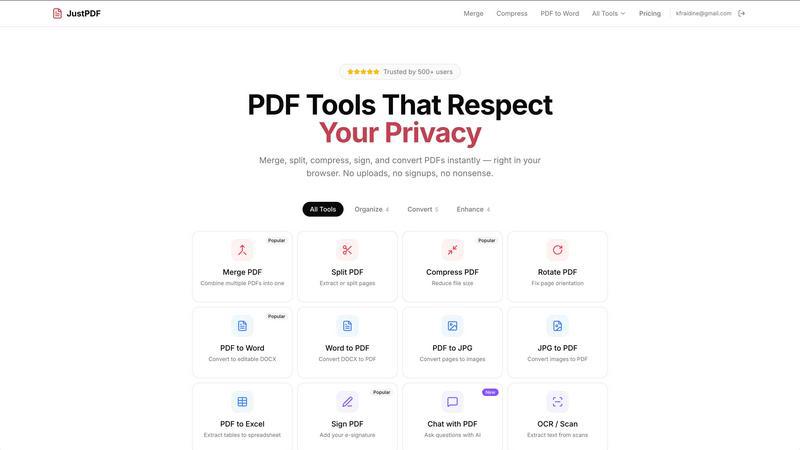
JustPDF is a privacy-focused PDF toolkit offering 17 free tools for merging, compressing, and converting PDFs directly in your browser.
About JustPDF
JustPDF is an innovative online tool that offers 17 professional-grade PDF solutions, all processed directly within the user's browser, ensuring complete data privacy. Unlike other online PDF services such as Smallpdf and iLovePDF that send files to remote servers, JustPDF leverages JavaScript and WebAssembly technology to handle all operations locally on the user's device. This guarantees that files remain secure and confidential, verifiable through tools like the Network tab in DevTools. JustPDF is designed for anyone needing quick and efficient PDF management, from students and educators to professionals and businesses. With features that include merging, splitting, compressing, and converting PDFs, JustPDF simplifies document handling without requiring an account for free users. The service complies with FERPA regulations, making it suitable for educational use, while its affordable Pro plan offers unlimited access for just $4 per month.
Features of JustPDF
Merge PDF
The Merge PDF feature allows users to easily combine multiple PDF documents into a single file. This is particularly useful for consolidating information, such as compiling reports or assembling documents for presentations. Users can simply drag and drop their files into the interface, and the tool will seamlessly merge them without any hassle.
Compress PDF
With the Compress PDF feature, users can reduce the size of their PDF files in just seconds. This tool is perfect for those needing to share large documents via email or other platforms where file size limits may apply. The compression process maintains the quality of the original document while ensuring it remains free of watermarks.
PDF to Word
The PDF to Word feature enables users to convert their PDF files into editable DOCX format effortlessly. This is especially beneficial for individuals who want to make changes or edits to their documents without having to start from scratch. The conversion retains the formatting and layout of the original PDF, making editing straightforward.
Chat with PDF (AI)
The Chat with PDF feature introduces an AI-driven interaction method, allowing users to ask questions about the content of their PDF files. This innovative tool makes it easier to extract information or clarify doubts without manually searching through the document, saving time and enhancing productivity.
Use Cases of JustPDF
Educational Use
JustPDF is ideal for students and educators who need to manage academic documents efficiently. Whether merging lecture notes, compressing files for submission, or converting PDFs to Word for editing, JustPDF provides a comprehensive suite of tools to support educational activities.
Business Documentation
Professionals can leverage JustPDF for managing business documents, such as contracts and reports. The ability to merge, split, and compress PDFs allows for streamlined workflows, while the PDF to Word feature facilitates easy editing and collaboration among team members.
Image Management
Photographers and graphic designers can benefit from the JPG to PDF and PDF to JPG conversion tools. These features enable them to create portfolios or presentations that combine images and text, enhancing their ability to showcase work effectively.
Secure Document Signing
With the Sign PDF feature, users can easily add e-signatures to their documents. This is particularly useful for legal and business transactions where signed documents are essential. JustPDF allows for quick and secure signing without the need for any additional software.
Frequently Asked Questions
Is JustPDF free to use?
Yes, JustPDF offers a free tier that allows users to perform three operations per day without requiring an account. This makes it accessible for those needing occasional PDF tools without any commitment.
How does JustPDF ensure privacy?
JustPDF processes all files locally within the user's browser, meaning that documents never leave the device. This approach guarantees that sensitive information remains secure and private.
Can I use JustPDF offline?
Yes, JustPDF works offline, allowing users to manage their PDF files without needing an internet connection. This feature is particularly beneficial for those in areas with limited internet access.
What payment options are available for the Pro plan?
The Pro plan for JustPDF starts at $4 per month and offers unlimited access to all tools. Users can subscribe easily without any hidden fees, providing a cost-effective solution for frequent PDF users.
Explore more in this category:
Similar to JustPDF

ButterShare
Transfer files between iPhone, Android, Windows, and Mac directly from your browser. Free, secure, and private. No apps, cloud storage, or signup.

AI Email Filter
AI Email Filter sorts incoming mail into folders using plain-language prompts you write. Works with any IMAP mailbox; bring your own LLM if you want.

Product Launch Checklist
A free launch checklist for SaaS, apps, AI tools and more. Every step says why it matters and when you can skip it.

Kody Tools
Free collection of online developer utilities, code formatters, and digital converters designed to streamline your daily workflow.

Forms Plugin
The #1 Native Form Builder Plugin for Framer - No Code, No Embeds, No External Platforms.


tallycounterweb.com
Tally Counter is a simple online counting tool for tracking attendance, workouts, inventory, sports scores, visitors, and everyday activities.
