

Formly
Formly lets you create, publish, and analyze forms by chatting with any AI agent, with a visual editor for fine-tuning every detail.
About Formly
Formly is a modern form-building platform that fundamentally reimagines how teams create, publish, and manage online forms by integrating directly with AI agents. Instead of starting from a blank page or wrestling with complex form builders, users can describe the outcome they want in plain language to AI agents like Claude, ChatGPT, Cursor, or Codex, and Formly generates a polished, high-converting form in seconds. The platform is designed for teams who need to collect qualified leads, screen job applicants, gather honest feedback, manage event signups, or handle any other data collection task without wasting time on manual form design. Once the AI generates a draft based on a simple description such as "I need to screen 200 job applicants," users can open the form in a full visual editor where they have complete control over every detail. This editor supports drag-and-drop blocks, multi-page flows, conditional logic, answer piping, file uploads, signatures, ratings, custom branding, and real-time preview. Formly also provides robust analytics, submission management, webhooks, email notifications, and GDPR-conscious hosting in Europe. The core value proposition is simple: you do not need a form, you need answers. Formly bridges that gap by letting AI handle the heavy lifting while giving you full creative control and ensuring your data remains secure and private.
Features of Formly
AI-Powered Form Generation
Formly eliminates the need to start from scratch by allowing users to describe their desired outcome in natural language to any connected AI agent. Whether you need a feedback survey, a job application with resume upload, or a lead capture form, you simply tell your agent what you want, and Formly automatically generates the questions, field types, and page flow optimized for completion. This feature saves hours of manual work and ensures your forms are built on proven conversion patterns, not guesswork. The one-time setup to connect your agent takes only about two minutes, after which the entire workflow becomes as simple as asking for what you need.
Full Visual Editor with Drag-and-Drop
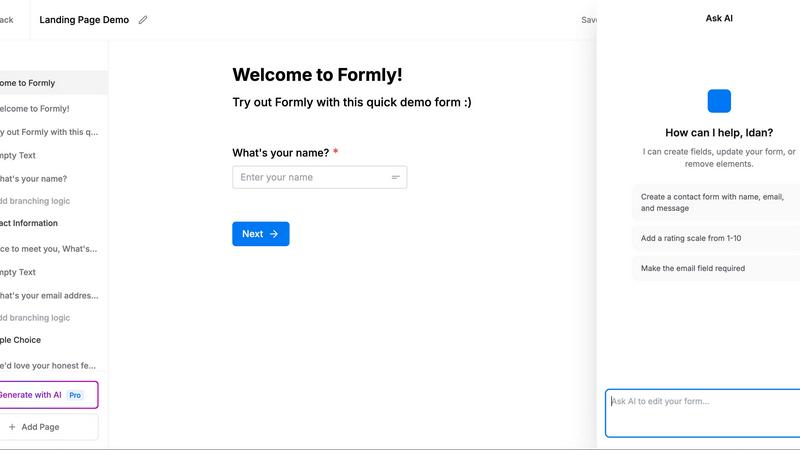
Every AI-generated form opens in a comprehensive visual editor, not a locked template. Users can fine-tune every aspect of the form, from layout and branding to individual field properties. The editor supports drag-and-drop blocks for adding text inputs, dropdowns, matrices, phone fields, email fields, and more. You can create multi-page forms to split longer surveys into focused steps, add conditional logic to show or hide questions based on previous answers, and use answer piping to personalize the experience. A real-time preview lets you see exactly how respondents will experience your form before you publish it.
Advanced Logic and Personalization
Formly provides powerful tools to make every form response feel relevant and personalized. Conditional logic allows you to create dynamic paths where subsequent questions depend on earlier answers, ensuring respondents only see what applies to them. Answer piping lets you insert previous responses into later questions, such as greeting a respondent by their first name or referencing their email. Variables can be used throughout the form to create a tailored experience. Multi-page flows help maintain respondent engagement by breaking long forms into digestible steps, reducing abandonment rates and improving completion.
Seamless Integration and Data Management
Formly ensures that the answers you collect go directly where you need them, not into a siloed dashboard. Every submission can be pushed to any service that accepts webhooks the moment it arrives, enabling real-time integration with CRMs, databases, and other tools. A REST API and MCP support allow your AI agent to fetch and summarize responses directly in chat. Formly also provides built-in analytics showing total responses, completion rates, and answer summaries. Email notifications keep your team informed instantly, and webhook integrations make it easy to connect with platforms like Notion, Zapier, and Make (coming soon).
Use Cases of Formly
Lead Generation and Qualification
Marketing and sales teams can use Formly to create high-converting lead capture forms that qualify prospects automatically. By describing the ideal customer profile to an AI agent, Formly generates a form with targeted questions that filter out unqualified leads. Conditional logic ensures that only relevant follow-up questions are shown, while answer piping personalizes the experience. Submissions are sent directly to the CRM via webhook, allowing sales teams to act on hot leads immediately. The analytics dashboard provides insights into conversion rates and common drop-off points, helping teams optimize their forms over time.
Job Application Screening
HR departments and hiring managers can streamline their recruitment process by generating job application forms that include resume uploads, cover letters, and screening questions. Formly supports file uploads, signatures, and multi-page flows that guide applicants through personal details, experience, and skills assessment. Conditional logic can automatically filter out candidates who do not meet minimum requirements, saving hours of manual review. All applications are collected in one place with full analytics on completion rates and average ratings, and webhooks can push new applications directly into an ATS or hiring database.
Customer Feedback and Surveys
Product teams and customer success managers can create detailed feedback surveys using Formly's AI-powered generation. Simply describe the feedback you need, such as a beta user survey or a post-purchase satisfaction questionnaire, and Formly builds a professional form with ratings, text inputs, and multiple-choice questions. Multi-page flows keep surveys organized and reduce fatigue, while answer piping personalizes questions based on previous responses. Analytics show response patterns and highlight common requests, such as feature suggestions or pain points. Webhooks can send feedback directly to project management tools like Notion or Jira.
Event Registration and Signups
Event organizers can build polished registration forms that collect attendee details, session preferences, and special requirements. Formly supports conditional logic to show different pricing tiers or add-on options based on selections, and file uploads allow attendees to submit documents or waivers. Multi-page forms can separate personal information from session choices, improving completion rates. Email notifications confirm registrations automatically, and webhooks sync attendee data directly with event management platforms or CRM systems. Custom branding ensures the form matches the event's visual identity.
Frequently Asked Questions
How do I connect Formly to my AI agent?
Connecting Formly to your AI agent is a one-time setup that takes about two minutes. You simply authorize the connection through your agent's interface, and from that point forward, you can ask your agent to create, modify, or analyze forms using natural language commands. Supported agents include Claude, ChatGPT, Cursor, Codex, and OpenClaw. The connection remains active, so you never need to repeat the setup process.
Is my data secure and compliant with privacy regulations?
Yes, Formly takes data privacy and security seriously. All forms and submissions are hosted on servers located in Europe, ensuring compliance with GDPR requirements. Formly does not use cookies or track your form responses for any purpose. Your data stays yours, and you have full control over how submissions are stored, exported, and integrated with other tools. This makes Formly suitable for handling sensitive information such as job applications and customer feedback.
Can I customize the look and feel of my forms?
Absolutely. Every form generated by AI opens in Formly's full visual editor, where you have complete control over branding and design. You can add your own logos, choose custom colors and fonts, and adjust layouts using drag-and-drop blocks. The editor supports real-time preview, so you can see exactly how your form will appear to respondents. You can also embed forms on your own website, use custom domains, or share them via short links.
How do I get my form responses out of Formly and into other tools?
Formly provides multiple ways to export and integrate your form responses. Webhooks allow you to push every submission to any service that accepts webhooks in real time, making it easy to connect with CRMs, databases, and automation platforms. You can also use the REST API to pull responses programmatically. Additionally, your AI agent can fetch and summarize responses for you directly in chat. Integrations with Notion, Zapier, and Make are coming soon based on user demand.
Similar to Formly

Forms Plugin
The #1 Native Form Builder Plugin for Framer - No Code, No Embeds, No External Platforms.

No Code Website Builder
Create and launch stunning websites and apps effortlessly in days using our premium no-code templates and powerful design tools.