

Cece AI
Cece AI is an email-based executive assistant for small businesses that handles scheduling, follow-ups, quotes, and invoices at a fraction of the.
About Cece AI
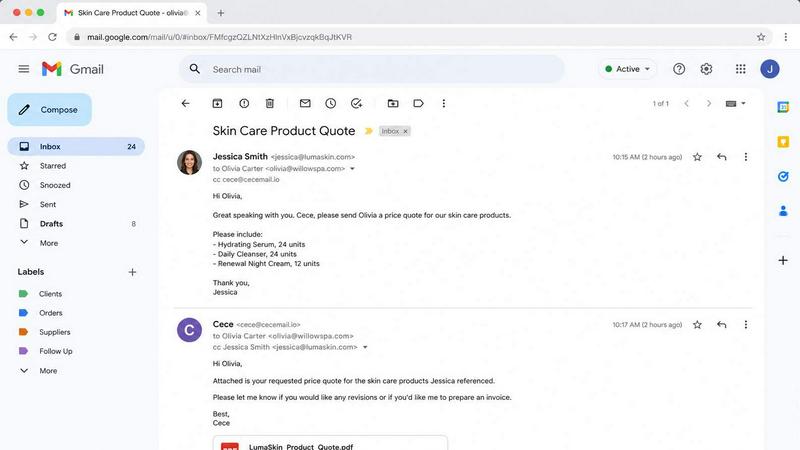
Cece AI is a practical and powerful AI executive assistant designed specifically for small business owners who need to reclaim their time from the overwhelming demands of daily operations. Unlike generic chatbots or complex software platforms, Cece AI operates directly within the email inbox, the place where most business communication already happens. By simply CCing Cece on an email, users can delegate a wide range of tasks, including scheduling meetings, responding to customer inquiries, creating professional quotes, sending invoices, tracking follow-ups, and managing reminders. The core value proposition is clear: Cece AI turns messy email threads into completed tasks, faster responses, and fewer dropped balls, all without the cost or overhead of hiring a full-time employee.
The setup process is straightforward. Users configure their business profile, calendar, price book, and preferences within the Cece dashboard. Once set up, Cece identifies the user by their sender domain and applies the correct business configuration to every request. This means Cece understands the context of each email, knows your services and pricing, and can take appropriate action without requiring constant supervision. Cece AI is not another tool to babysit; it is a reliable, cost-effective assistant for businesses in industries like plumbing, law, insurance, consulting, and many more. The goal is to reduce admin work, accelerate customer communication, and give business owners more time to focus on the work that truly matters.
Features of Cece AI
Intelligent Email-Based Task Execution
Cece AI operates entirely through email, making it incredibly easy to use. When you CC [email protected] on any email thread, she reads the conversation, understands the context, and takes the necessary action. This could involve scheduling a meeting, generating a quote, sending an invoice, or crafting a professional reply. The system is designed to handle complex workflows without requiring users to learn a new interface or platform.
Automated Scheduling and Calendar Management
Cece integrates directly with your calendar to manage scheduling requests. When a client asks for a meeting, Cece checks your availability, coordinates timing with the other participants, and sends a calendar invite complete with a Google Meet link. This entire process happens within the email thread, eliminating the back-and-forth that typically accompanies scheduling. Cece ensures that meetings are booked efficiently and that all parties receive the necessary details.
Professional Document and Quote Generation
Cece can generate high-quality, branded documents directly from email requests. For example, when a customer asks for a wholesale quote, Cece can calculate pricing based on your pre-configured price book, apply any applicable discounts, and generate a professional PDF document. This document includes your company details, payment terms, lead times, and is ready to send in seconds. This feature saves significant time and ensures consistency in your business communications.
Proactive Follow-Up and Reminder Management
Cece AI excels at keeping workflows moving. If a follow-up is needed on an invoice or a proposal, Cece can automatically send a polite reminder to the client. The system also tracks the status of tasks and can suggest next steps. For instance, if it has been 12 days since a follow-up, Cece might note this and ask if you want to chase the client again on a specific day. This proactive approach helps prevent opportunities from slipping through the cracks.
Use Cases of Cece AI
Streamlining Customer Communication for Service Businesses
A plumber or electrician receives dozens of emails daily from customers requesting quotes, scheduling service calls, or asking about availability. Cece AI can handle these inquiries by checking the business's price book and schedule, then responding with a professional quote or a proposed appointment time. This frees the business owner from constantly checking their inbox and allows them to focus on completing jobs on-site.
Managing Client Intake and Follow-Ups for Professional Services
Law firms, accountants, and consultants often struggle with client intake and follow-up. Cece can be CCed on an initial inquiry email and can automatically send a welcome packet, schedule an initial consultation, and set reminders for follow-up after the meeting. This ensures that no potential client is forgotten and that the intake process is smooth and professional, even when the professional is busy with billable work.
Automating Invoicing and Payment Reminders for Freelancers
Freelancers and independent consultants often spend hours chasing payments. With Cece AI, they can simply forward an email about a completed project, and Cece will generate an invoice based on the agreed-upon terms, send it to the client, and then track its status. If the invoice goes unpaid, Cece will send a friendly reminder after a set number of days, reducing the administrative burden of accounts receivable.
Handling Real Estate Transaction Coordination
Realtors manage a high volume of time-sensitive emails involving property showings, offers, and contract deadlines. Cece can help by scheduling property viewings with potential buyers, sending follow-up emails after an open house, and coordinating with title companies and mortgage brokers. By managing these repetitive communication tasks, Cece allows the realtor to spend more time with clients and closing deals.
Frequently Asked Questions
How does Cece AI identify me and my business?
Cece AI identifies you by your sender domain. When you email [email protected] from your business email address, the system recognizes your domain and automatically applies the business configuration you set up in the Cece dashboard. This includes your services, pricing, calendar, and preferences, ensuring that all actions are tailored to your specific business.
Do I need to install any software or learn a new platform?
No. Cece AI is designed to work entirely through email. There is no software to install or new platform to learn. You simply CC [email protected] on your existing email threads, and Cece handles the rest. The initial setup requires configuring your dashboard, but after that, all daily interaction happens directly within your inbox.
What kind of tasks can Cece AI handle?
Cece AI can handle a wide range of tasks including scheduling meetings, responding to customer inquiries, creating and sending professional quotes and invoices, tracking follow-ups, managing reminders, and coordinating with multiple parties. It is designed to turn messy email threads into completed tasks and faster responses. The system is particularly effective for small businesses that run on email.
How much does Cece AI cost?
Cece AI offers a 14-day free trial for new users. After the trial, the service starts at $88 per month. Payment details are collected at checkout. This pricing is a fraction of the cost of hiring a full-time employee or a virtual assistant, making it a highly cost-effective solution for small businesses looking to reduce admin work and improve communication efficiency.
Explore more in this category:
Similar to Cece AI

Product Launch Checklist
A free launch checklist for SaaS, apps, AI tools and more. Every step says why it matters and when you can skip it.

Kody Tools
Free collection of online developer utilities, code formatters, and digital converters designed to streamline your daily workflow.

Forms Plugin
The #1 Native Form Builder Plugin for Framer - No Code, No Embeds, No External Platforms.


tallycounterweb.com
Tally Counter is a simple online counting tool for tracking attendance, workouts, inventory, sports scores, visitors, and everyday activities.


iHatePosting
Schedule, customize, and publish content across 14 social networks from one powerful social media scheduler.
